Foundations of AI for CRE Professionals
The conceptual grounding — what these models actually do, and don't.
Who was in the room
Session 2 drew a healthy cross-section of the network — from people just getting started to seasoned practitioners with deep production experience. The mix was a strength: beginners felt safe asking foundational questions, and the advanced voices added texture without talking over anyone.
Co-leads: Ivy Marguerite set the agenda and steered the Q&A; Sarah Gudeman (BranchPattern, Omaha) opened with the group's origin story and kept the energy moving. Featured presenter: Karan Khanna, CTO at EyeQ Monitoring, delivered a pragmatic ~20-minute landscape talk — comfortable going deep on tokens, edge models, and agent orchestration, but consistently translating back to everyday CRE use cases.
Where the puck is going
- Models will keep improving for at least the next few years — no plateau yet.
- Specialized vertical models are emerging, including real-estate-focused ones.
- Token / inference costs are dropping fast and will continue to.
- Edge models (running on laptop/phone) will become more prevalent — less cloud dependency, lower cost.
- Agents are arriving — most mature in software engineering today, but spreading fast.
- Any frontier model handles CRE use cases well. Copilot still lags but may catch up via the Microsoft–Anthropic deal.
How to choose a tool (in priority order)
- Company policy — if mandated, use it.
- Security — use whatever IT has blessed.
- Enterprise version over public (your data isn't used for training).
- Paid over free (better context retention, faster, ~$20–30/mo).
- Context window size for large documents.
- Integration with your productivity suite (Google Workspace vs. M365).
Gotchas & good practices
- Don't violate company policy.
- Watch token costs on long agentic tasks (transactional use is fine).
- Always do a final human review.
- Use multiple models to learn their quirks; experiment in personal domains, then translate to work.
Q&A highlights
- Token costs: a few hundred tokens per chat, dropping fast — a one-hour Claude agent run might cost ~$1 today.
- Michelle on Claude: argued it's the most "humanized" model, especially for voice-matching and personality work.
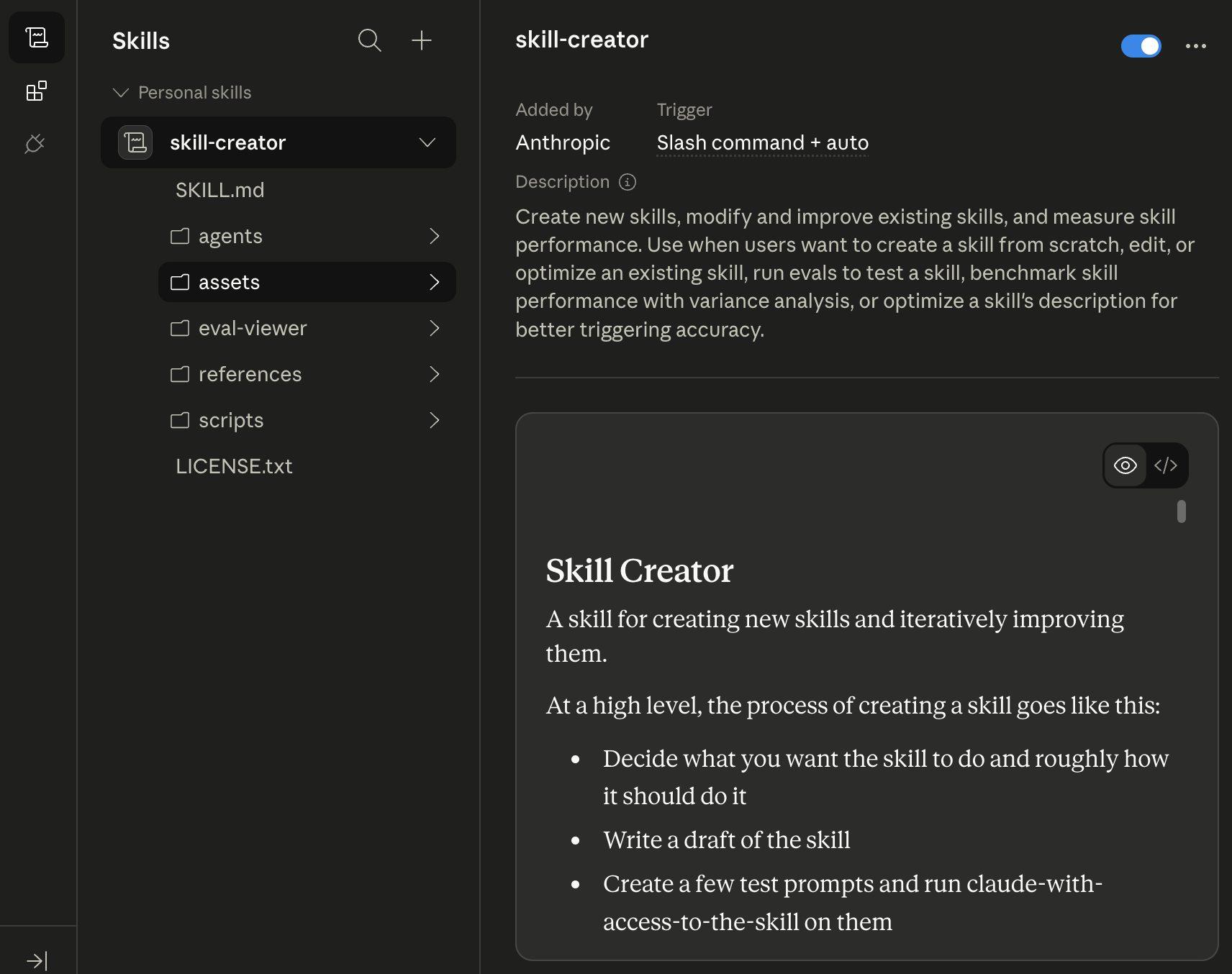
- Claude "skills": build hierarchical skills assigned to parallel agents with an orchestrator collating results. Meta-prompt Claude to teach you how to build them.
- Meeting notes: Fireflies for API-friendly auto-sharing; also the Bee wearable and Whisper for dictation.
- Recording legality: one-party vs. two-party consent varies by state — disclose and offer to share the transcript.
- Security: don't give a model PII or financial info without an enterprise version. The real risk is shadow AI when firms over-restrict and employees route around policy. Aim for smart-but-not-restrictive governance.
- Redaction: use Adobe's redaction tool on sensitive PDFs before uploading.
Closing challenge
Between now and next session, each member tries one thing — a workflow to speed up, a time sink to automate, or a new way to get information faster.
Recurring logistics: 3rd Friday of every month, 10:00 AM ET. Email Ivy at imarguerite@eyeqmonitoring.com to be added, or register for the webinar.
Watch & review.
The full recording plus Ivy’s deck, slide-by-slide with the demo screenshots and a PDF download. No Notion required.
Trouble viewing? The recording is hosted on SharePoint — you may need access or to be signed in. Open it directly →
Demo – Personalization, Agents.
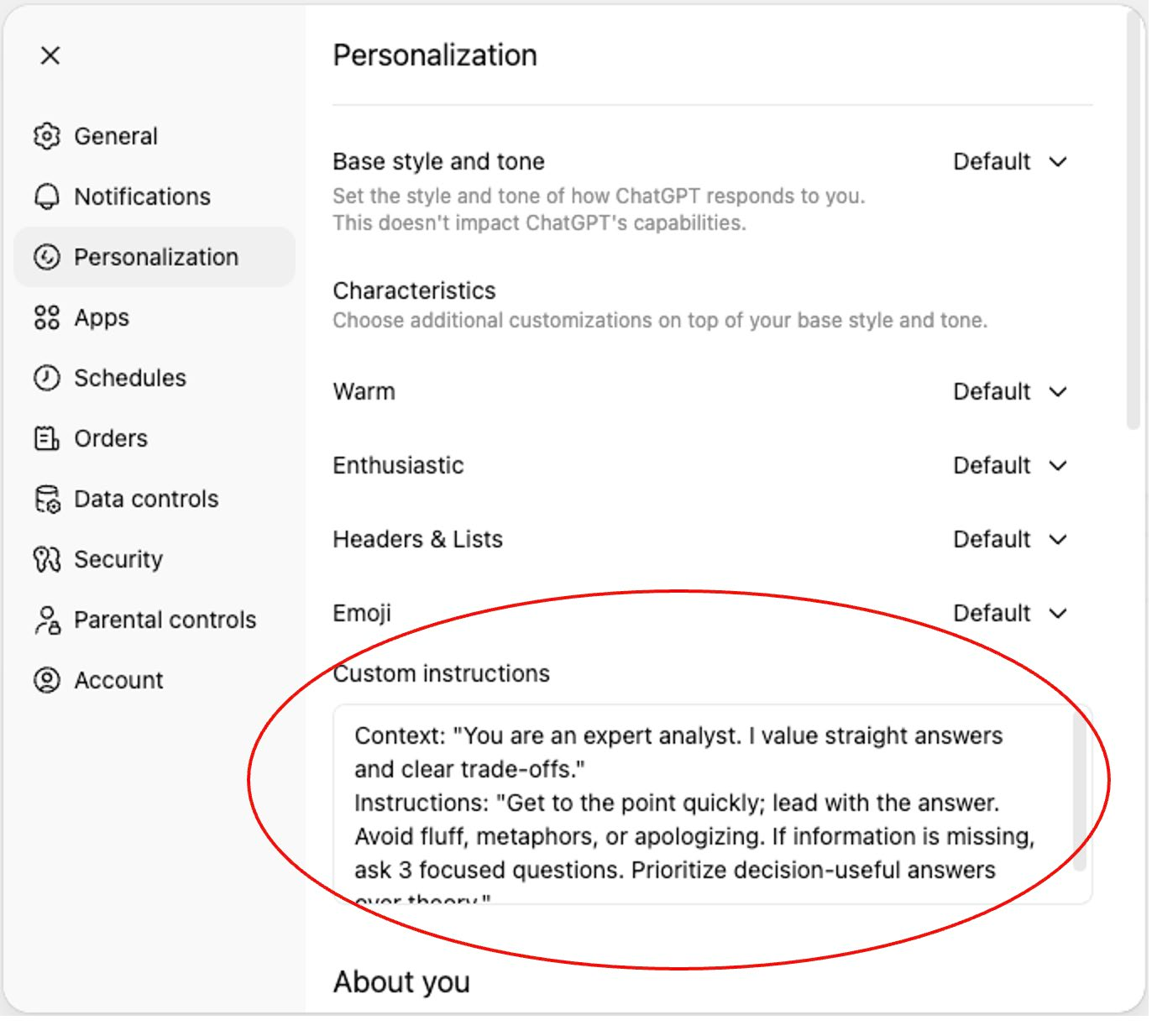
- ChatGPT – Personalization to your writing style, tone…
- Claude Cowork/Desktop – Personalized skills. (Very Geeky)